

Is Your Oven Completely Dead? Check the Clock First
If your oven has suddenly stopped working — no heat, no fan, no neon indicator light, and on a gas oven no ignition or sound of gas — before calling an engineer, check the clock. This is one of the most common reasons an oven appears completely dead, and it is almost always something you can fix yourself in under a minute.
There are two types of cooker clock and it is important to understand the difference.
Type 1 — The Minute Minder
A minute minder clock has two functions — it shows the time, and it has a countdown timer. To use it, you set the timer for however long you want to cook, turn the oven on manually, and the clock counts down and beeps when the time is up. You then have to go and turn the oven off yourself.
This type of clock has no internal switch and does not control whether the oven works or not. If power is lost and restored, the oven will work as normal — you just need to reset the time on the clock display. This type will never cause your oven to stop working.
Type 2 — The Automatic Timer
An automatic timer clock has all the functions of a minute minder but with one important addition — it can automatically switch the oven on and off at times you set in advance. You set a cook start time and a cook end time, and the clock handles the rest.
This is made possible by an internal relay — an electronic switch — inside the clock module. When the clock is in manual mode, this relay is on and the oven works normally. When you set an automatic cook time, the relay switches off and stays off until the correct start time, then switches back on to start cooking and off again at the end time.
When the clock is in manual mode the oven works normally. When it is in automatic mode — indicated by an illuminated A or Auto in the display — the internal relay is off and the oven will not work regardless of what you do with the oven controls, unless the actual time falls within the cook start and end times you have previously set, in which case the oven will come on automatically.
What Happens After a Power Cut
This is where most people run into trouble. When power is lost and then restored, the automatic clock resets itself — but it defaults to automatic mode with no time set. The relay is off, and the oven will not come on. The oven appears completely dead.
The fix is simple — you just need to set the clock to any time. It does not have to be the correct time. Once a time is set, the clock returns to manual mode, the relay switches on, and the oven works again.
Look at the clock display. If you can see an A or Auto illuminated, it is in automatic mode — you need to set the clock until the A or Auto is no longer displayed. Once it disappears the clock is back in manual mode and the oven will work normally.
How to Reset the Clock
This is where it gets complicated — there is no universal method. Cooker clocks come with 3, 5 or 6 buttons and the combination required to set the time varies considerably between manufacturers and even between models from the same manufacturer.
The general principle is: press and hold (or press and release) two specific buttons to enter clock-setting mode, then use the + and − buttons to set any time. On some clocks those two buttons must be kept held down while you increment the time, on others you press and release them first. Which two buttons depends entirely on your clock:
- On a 5 or 6 button clock it tends to be the cook time and cook end time buttons pressed together
- On a 3 button timer it may be the outer two buttons, or the middle one
The images below show three different clock configurations as examples — your clock may look different to all of them.
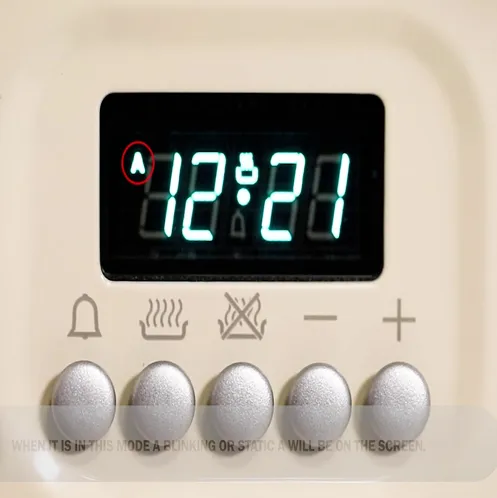
Automatic Clock in Auto Mode
The illuminated A confirms this clock is in automatic mode — the oven will not work. Setting any time will return it to manual mode.
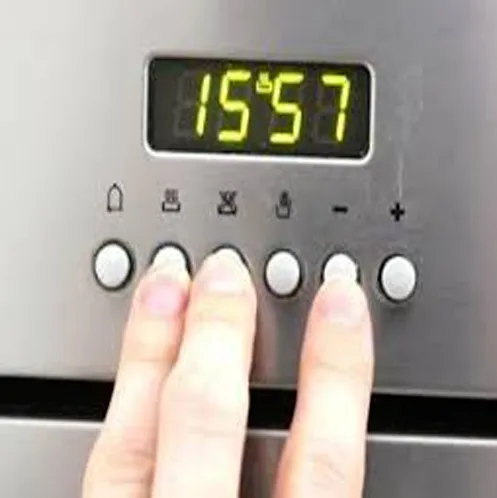
6 Button Clock Example
From left to right:
- Bell — minute minder
- Pan with steam — cook time
- Pan with line through — end cook time
- Hand — manual mode
- − and + — decrement and increment
On this clock, buttons 2 and 3 are pressed while using the + or − button to set the time and exit auto mode.
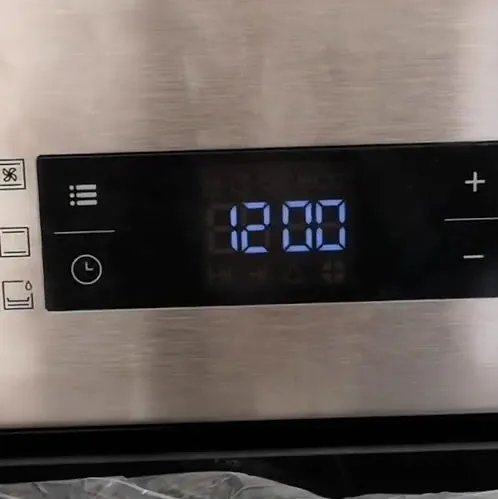
Beko Clock
On Beko ovens the safe mode is not always obvious from the display — the oven may appear completely dead with no obvious indication. There are four buttons, one in each corner. Press and release the top left button (the three-line button) repeatedly — it cycles through modes. When a clock symbol appears, use the + and − buttons to set any time.
If you cannot work out the combination for your clock, the best starting point is your oven's instruction manual — most are available to download from the manufacturer's website by searching the model number. There are also plenty of YouTube videos covering specific models — search for your make and model number and you will likely find a step by step guide.
Which Oven Does the Clock Control?
It is important to note that the clock typically only controls one oven — usually the main oven. On a built-in oven or a standard freestanding cooker this is straightforward. On a range cooker it could be either the left hand or right hand oven, though some manufacturers fit clocks that can control either oven. Rangemaster has produced models where the clock controls both ovens. Some Fischer & Paykel range cookers take this further and have two separate clocks — one for each oven.
If one oven on your range is working and the other is not, the clock is the first thing to check.
Still Not Working After Resetting the Clock?
If you have reset the clock and the oven is still not working, you would expect the fault to lie elsewhere. However if the symptoms are:
- Power has recently been lost and restored to the appliance
- The thermostat neon is not coming on
- The oven fan is not running, or on a gas oven there is no ignition and no sound of gas
- No heat at all
Then you have most likely not fully reset the clock — go back and try again until the A or Auto is no longer displayed.
If the clock is clearly in manual mode and the oven is still not working, FixCookers can diagnose and repair most cooker and oven faults, covering Sheffield, Rotherham and Barnsley.

07951 899378
WhatsApp Us